HOW IT WORKS
Three steps from
product to passport.
Create a structured record, attach the evidence that supports it, and share a
single trusted link with anyone who asks. No new system to learn, no scattered
documents to chase.
THE WORKFLOW
A simple,repeatable workflow.

Create
Build a structured digital record for your product.

Attach
Upload the certificates, reports, and supplier files.

Share
Send a trusted link to anyone who asks for proof.
CREATE A PRODUCT PASSPORT
Build the central identity
of your product.
Start by creating a digital record for your product. Add basic product details — SKU, materials, manufacturer, and supplier information. This becomes the central identity for all product data and compliance documentation.
 One passport per product or SKU
- Bulk import from a spreadsheet if you already have product data
- Pre-filled templates for common product categories
'%3e%3cpath%20id='Vector'%20d='M6.99922%2013.3002C10.4786%2013.3002%2013.2992%2010.4796%2013.2992%207.0002C13.2992%203.5208%2010.4786%200.700195%206.99922%200.700195C3.51982%200.700195%200.699219%203.5208%200.699219%207.0002C0.699219%2010.4796%203.51982%2013.3002%206.99922%2013.3002Z'%20stroke='%236B7570'/%3e%3cpath%20id='Vector_2'%20d='M7.00078%205.1998C7.38738%205.1998%207.70078%204.8864%207.70078%204.4998C7.70078%204.11321%207.38738%203.7998%207.00078%203.7998C6.61418%203.7998%206.30078%204.11321%206.30078%204.4998C6.30078%204.8864%206.61418%205.1998%207.00078%205.1998Z'%20fill='%236B7570'/%3e%3cg%20id='Vector_3'%3e%3cpath%20d='M7%206.5V10.5V6.5Z'%20fill='black'/%3e%3cpath%20d='M7%206.5V10.5'%20stroke='%236B7570'%20stroke-width='1.2'%20stroke-linecap='round'/%3e%3c/g%3e%3c/g%3e%3cdefs%3e%3cclipPath%20id='clip0_4484_14825'%3e%3crect%20width='14'%20height='14'%20fill='white'/%3e%3c/clipPath%3e%3c/defs%3e%3c/svg%3e) No data leaves your account until you decide to share it.
No data leaves your account until you decide to share it. 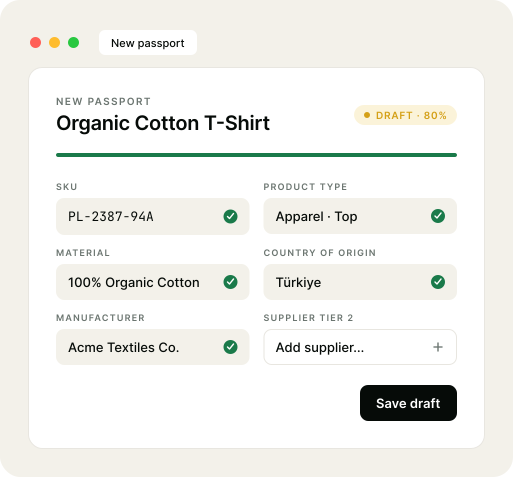
UPLOAD EVIDENCE
Attach the proof behind every claim.
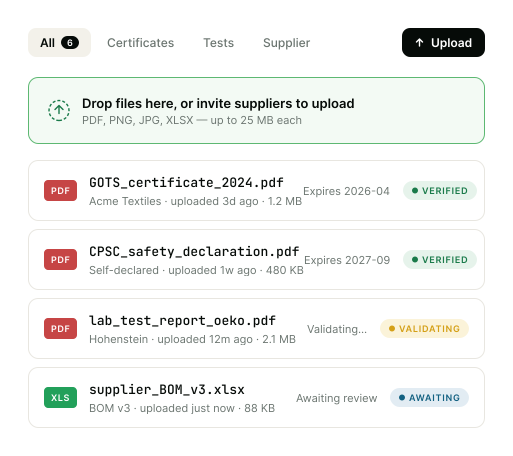
Upload the documents that support your product claims: supplier declarations, certificates, test reports, or other compliance files. All evidence is organized and linked directly to the product passport.
- Drag-and-drop or invite suppliers to upload directly
- Auto-tagging by document type (certificate / test / declaration)
- Expiry dates tracked — get notified before evidence goes stale
Documents stay private until you generate a shareable link.
SHARE A COMPLIANCE LINK
One link.
Every check answered.
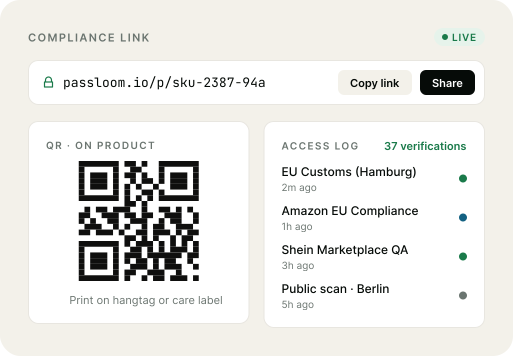
When platforms, partners, or regulators request proof, simply share your compliance link. Your product passport presents the relevant product information and documentation in one place — clear, structured, and easy to verify.
- Public passport link or scannable QR code on the product itself
- Granular view control: hide supplier names from public, show to regulators
- Audit trail: see every time the link is viewed, by whom, and when
Revoke or rotate links any time. Old links never expire your trust.
WHAT YOU DON'T HAVE TO DO
No new system to learn,
no team to set up.
'%3e%3cpath%20id='Vector'%20d='M11%2021C16.5228%2021%2021%2016.5228%2021%2011C21%205.47715%2016.5228%201%2011%201C5.47715%201%201%205.47715%201%2011C1%2016.5228%205.47715%2021%2011%2021Z'%20fill='%23FBE9E9'%20stroke='%23C64545'%20stroke-width='1.4'/%3e%3cg%20id='Vector_2'%3e%3cpath%20d='M6.5%206.5L15.5%2015.5L6.5%206.5ZM15.5%206.5L6.5%2015.5L15.5%206.5Z'%20fill='black'/%3e%3cpath%20d='M6.5%206.5L15.5%2015.5M15.5%206.5L6.5%2015.5'%20stroke='%23C64545'%20stroke-width='1.4'%20stroke-linecap='round'/%3e%3c/g%3e%3c/g%3e%3cdefs%3e%3cclipPath%20id='clip0_4484_15260'%3e%3crect%20width='22'%20height='22'%20fill='white'/%3e%3c/clipPath%3e%3c/defs%3e%3c/svg%3e)
Hire a compliance team
Passloom is designed for small teams. Add the first product yourself in under 30 minutes.
Replace your existing tools
Keep using your PIM, ERP, or spreadsheets. Passloom imports and references — it doesn't replace.
Re-collect supplier files
Invite suppliers directly. They upload once, and your evidence library updates automatically.
Build a custom QR system
QR codes and public passport pages are generated for you — printable, scannable, brand-able.
GET STARTED
Create your first passport.
About 30 minutes from sign-up to a shareable compliance link.
No credit card, no sales call.